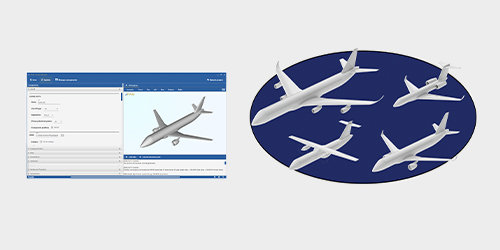

JPAD Modeller by SmartUp Engineering

Accelerate modeling and automate your workflows

JPAD Modeller is an innovative software for aircraft design that accelerates conceptual and preliminary design phases by generating a full aircraft in seconds from TLARs and a few assumptions. It improves processes by automating high-fidelity, parametric CAD model creation and enabling export to tools like Altair® FlightStream™.

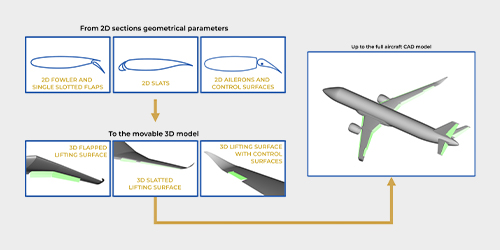
The tool simplifies workflows enabling automatic generation of key aircraft components, including lifting surface tips, winglets, fairings, pylons, propeller disks, nacelles, moveables, and control surfaces.
Why JPAD Modeller?

Altair_APA_jPAD-Modeller_Why-1

Automated Geometry and CAD Generation

JPAD Modeller automates the creation of watertight aircraft geometries and high-fidelity CAD models with complex details in a few seconds reducing manual work.

Altair_APA_jPAD-Modeller_Why-2

Seamless Integration with Third-party CAD Software

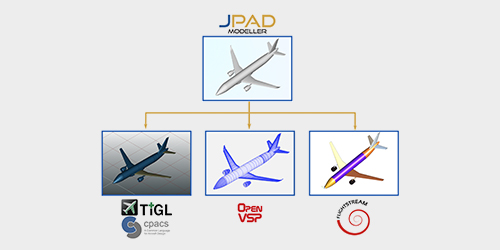
It enables direct export to several analysis tools and third-party CAD software, including Altair® FlightStream™.

Altair_APA_jPAD-Modeller_Why-3

Advanced Design Exploration

JPAD Modeller efficiently explores numerous design variations, optimizing key aerodynamic components like flaps, winglets, nacelles, pylons and lifting surfaces.

Key Features

Automated CAD Modeling

Create high-fidelity aircraft CAD models from simple geometrical parameters in a few seconds.

Conceptual Design from TLARs

Generate complete and detailed aircraft models starting from a few Top-Level Aircraft Requirements, geometrical and aerodynamic assumptions.

Simple Modeling of Complex Components

Use simple geometrical parameters to handle complex and time-consuming modeling processes of winglets, nacelles, pylons, and movables.

Quick Geometry Updates

Generate different versions of aircraft designs with intuitive update strategies and see results on 3D models in seconds.

Interoperability with Analysis Tools

Export models to third-party commercial tools (SolidWorks, CATIA) as starting point for detailed design phase and analyses (Altair® FlightStream™, CFD tools).

UI Mode or Batch Mode

Use JPAD Modeller with its user-friendly user interface or use it in batch mode to automate design workflows.